







A yellow ghost of your keyboard, navigation bar or status bar on an OLED phone is almost always permanent burn-in. The blue sub-pixels in that spot have worn out faster than the red and green ones around them. It won’t heal, but you can hide it or replace the panel. If the whole screen looks evenly warm, or a patch keeps growing from one edge, the cause is something else, and a growing patch can be a safety problem.
Need to know
- A yellow ghost shaped like part of the interface is burn-in. An even tint across the whole screen is usually a software filter or bug.
- Test with a full-screen white and a 50% gray image. A yellow test image switches off the blue sub-pixels, so it can’t show blue wear.
- Image persistence fades within minutes, as Apple notes. Burn-in never fades.
- A yellow patch that spreads from an edge or changes when you press it can mean a swollen battery. Stop charging the phone.
- In 2026 an out-of-warranty iPhone 17 Pro Max screen costs $379 at Apple. Samsung lists Galaxy S25 Ultra screen repairs at $279.
Fact-checked
We checked these key facts against the sources named, on November 26, 2026:
- In 2023 some iPhone 15 owners reported severe ghost images that looked like burn-in (source: techspot.com)
- With AppleCare+, a screen repair costs $29 either way, compared with $379 out of warranty for an iPhone 17 Pro Max (source: apple.com)
- Out of warranty, Apple charges $329 for an iPhone 17, iPhone Air or iPhone 17 Pro screen and $379 for the iPhone 17 Pro Max (source: 9to5mac.com)
- The genuine Pixel 10 Pro screen assembly alone costs around $243 to $249 through iFixit, Google’s official parts partner, before any labour (source: ifixit.com)
- It pairs a blue fluorescent lower layer with a new blue phosphorescent upper layer, and LG Display claims about 15% lower power consumption than existing OLED (source: techspot.com)
Yellow screen burn: the 30-second answer
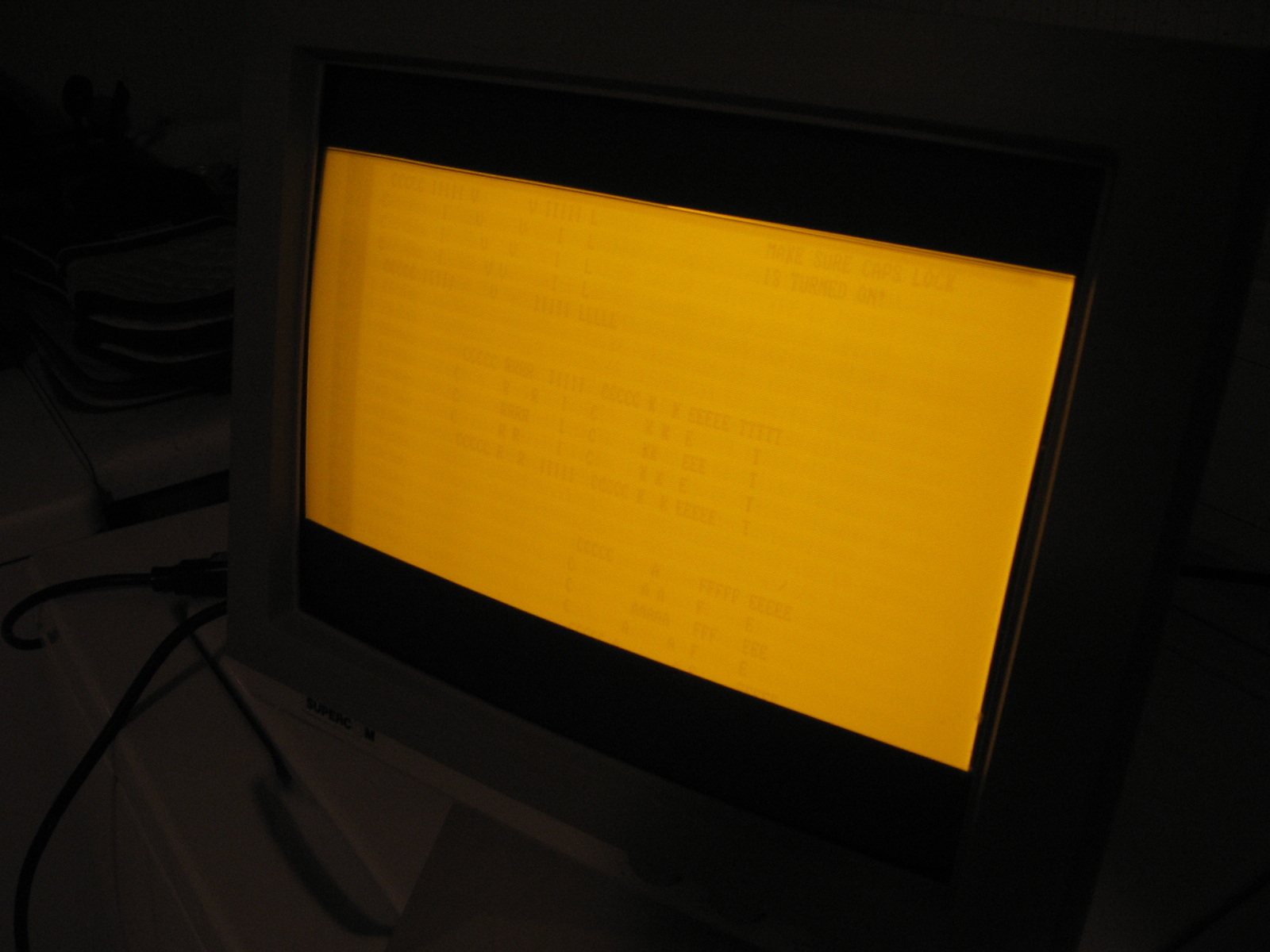
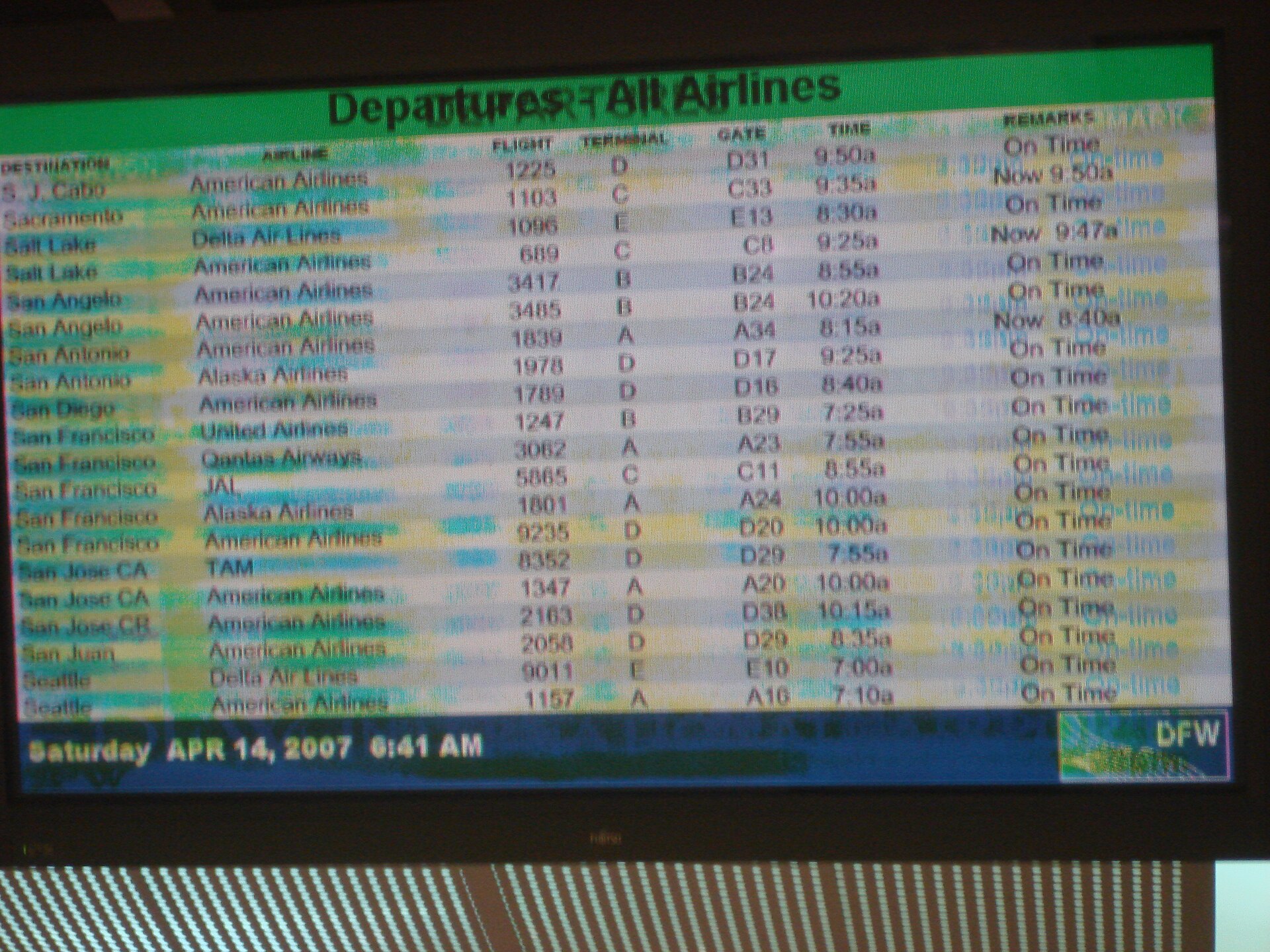
Yellow screen burn is uneven ageing of an OLED panel. Bright, static interface elements wear down the blue emitters underneath them, so that part of the screen shows more red and green light, and red plus green looks yellow. You see it most on white or light-gray backgrounds.
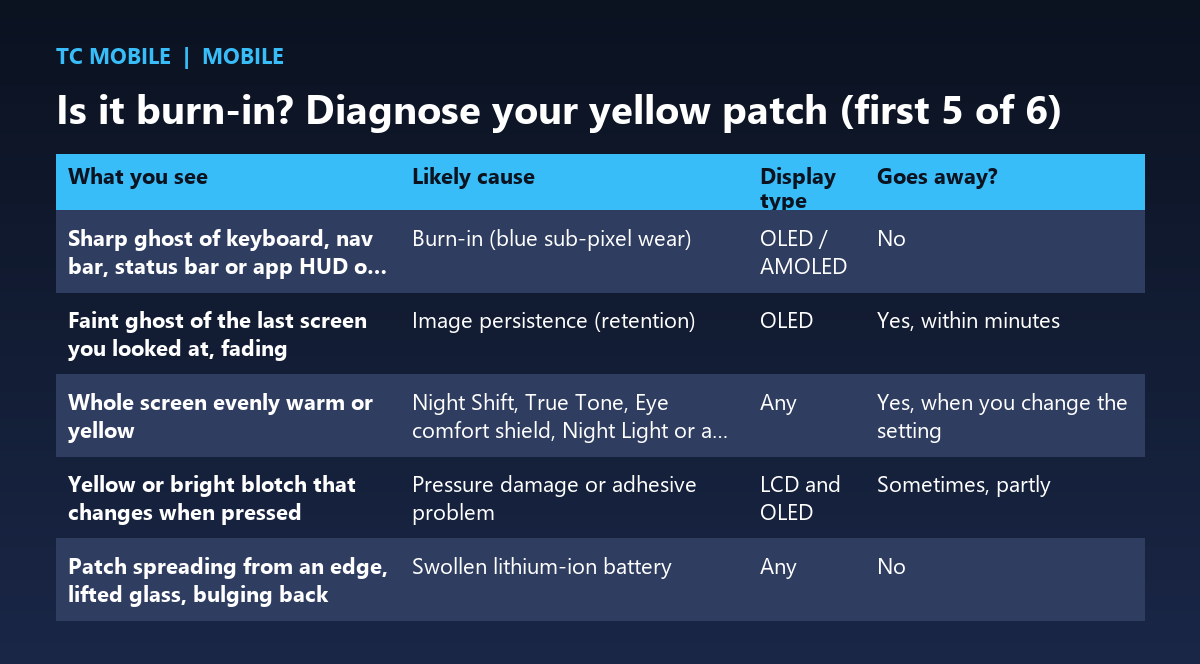
The shape tells you the most. A sharp outline of the keyboard, the gesture pill, the status-bar icons or a navigation app’s direction banner points to burn-in. A warm cast over the whole display points to software. A soft blob that moves, spreads or reacts to pressure points to physical damage. The diagnostic table below sorts these cases quickly.
Why OLED burn-in looks yellow (not gray)
Burn-in looks yellow because the three sub-pixel colours don’t age at the same rate. Blue wears fastest. When blue output drops in one area, white content there loses its blue, and what is left is a yellowish mix of red and green.
The blue sub-pixel problem
Every OLED pixel is made of separate red, green and blue sub-pixels, and each one is an organic emitter that dims a little with every hour of use. Red and green emitters in commercial phone panels use phosphorescent materials, which are efficient. Blue still uses fluorescent material, which is less efficient. Blue light also carries more energy per photon, so the blue emitters have to be driven harder to produce the same brightness, and they degrade sooner.
Panel makers compensate in several ways. Many phone OLEDs use blue sub-pixels that are physically larger than the red and green ones, so blue can run at a lower current density. Apple says its iPhone OLED displays run algorithms that track how much each individual pixel is used and then produce calibration data to even out the ageing. These measures slow the wear down. They can’t stop it in an area that shows the same bright shape for thousands of hours.
Why it’s yellow on some phones and pinkish on others
The tint depends on which colour has lost the most output relative to the others. When blue wears most, white areas look yellow. On a mid-gray background the same patch looks muddier and can read as tan or brown. When green has aged more than red in a particular panel or layout, the ghost leans pink or magenta, which is why some owners describe their burn-in as reddish.
Brightness compensation can also change the colour. As a panel’s software pushes worn areas harder, the residual tint shifts. Two phones with the same burn-in pattern can therefore show slightly different colours.
Is it burn-in? Diagnose your yellow patch
Five things commonly cause a yellow patch or tint on a phone: OLED burn-in, temporary image persistence, a warm-tint filter or software bug, a pressure mark or ageing LCD backlight, and a swollen battery. The shape of the yellow area and how it behaves over a few minutes separate them reliably.
| What you see | Likely cause | Display type | Goes away? | What to do |
|---|---|---|---|---|
| Sharp ghost of keyboard, nav bar, status bar or app HUD on white | Burn-in (blue sub-pixel wear) | OLED / AMOLED | No | Mask it, or replace the panel |
| Faint ghost of the last screen you looked at, fading | Image persistence (retention) | OLED | Yes, within minutes | Use the phone normally; check again later |
| Whole screen evenly warm or yellow | Night Shift, True Tone, Eye comfort shield, Night Light or a bug | Any | Yes, when you change the setting | Turn filters off; update the software |
| Yellow or bright blotch that changes when pressed | Pressure damage or adhesive problem | LCD and OLED | Sometimes, partly | Stop pressing it; get an inspection |
| Patch spreading from an edge, lifted glass, bulging back | Swollen lithium-ion battery | Any | No | Stop charging; repair right away |
| Slow overall yellowing over years | Ageing backlight, polarizer or light guide | LCD (IPS) | No | Calibrate if possible, or replace |
Watch out
A yellow patch that grows week by week, with glass that looks raised at one edge, is not burn-in. Treat it as a battery problem first.
Burn-in vs. image persistence
Image persistence is temporary and burn-in is permanent. Apple’s support page for the Super Retina and Super Retina XDR displays describes image persistence as a faint remnant of an earlier image. It says the effect disappears after a few minutes of normal use. Burn-in, Apple adds, can happen in more extreme cases, when the same high-contrast image stays on screen at high brightness for prolonged periods.
The practical test is time. Open a white page and look for the ghost, then use the phone with varied content for 10 to 15 minutes and look again. If the ghost has faded, it was persistence. If it looks identical, it is burn-in.
Software can also cause persistence. In 2023 some iPhone 15 owners reported severe ghost images that looked like burn-in. Apple’s iOS 17.1 release notes then listed a fix for an issue that “may cause display image persistence,” according to MacRumors.
This also answers a common worry: “Screen burn on my Galaxy S24 Ultra after less than a week?” True burn-in within days of normal use would be very unusual. A ghost that early is more likely persistence, a software issue or a panel defect. All three are reasons to book an inspection while you are still inside the return window.
Did you know?
Apple has told iPhone owners since the iPhone X launched in 2017 that slight OLED image persistence is normal. Its current support document still says the temporary version disappears after a few minutes of normal use.
Software warm-tint filters and bugs
An even yellow tint across the entire screen is almost never burn-in. Burn-in follows the shapes of interface elements, while a filter tints everything equally. The usual suspects are Night Shift and True Tone on iPhone, Eye comfort shield on Samsung Galaxy phones, and Night Light on Google Pixel.
Bugs can do the same thing. After the One UI 6 update, some Galaxy owners saw a sudden yellow tint across the whole display. SamMobile reported in January 2024 that the workaround was to switch off the eye-comfort filter and set its schedule to None. So if your display turned yellowish right after an update, start with the settings, not a repair shop.
Rule out software first
Before you assume burn-in, turn off Eye comfort shield (Samsung), Night Shift and True Tone (iPhone) or Night Light (Pixel). If the yellow disappears, it was software. On One UI 6, also set the filter’s schedule to None.
Pressure marks and post-repair yellowing
A tint that changes when you press it is mechanical. On LCD phones, pressure deforms the backlight layers and leaves bright or yellowish blotches, the same mechanism behind a white spot on screen. OLED panels have no backlight, but pressure can still crack internal layers or damage the panel, and that leaves discoloured areas.
Yellowing at the edges after a third-party screen or battery replacement usually comes from the repair itself. Common causes are uneven adhesive, a battery that sits too thick and presses on the panel, or a low-grade replacement display with poor colour uniformity. Return to the shop that did the work, because most repairers give a warranty on parts. If your phone screen has lines as well as the tint, a damaged panel or connector is more likely than burn-in.
Swollen battery: the yellow patch that grows (stop charging)
A swollen lithium-ion battery can push against the back of the display and cause hazy or discoloured patches, often starting at one edge. iFixit advises stopping use of a phone with a swollen battery immediately. That is one community question answered directly: a yellow tint in the bottom right corner that “doesn’t go away” and is “getting bigger” fits this pattern far better than burn-in.
The same thing shows up on laptops and tablets. On Microsoft Q&A, a Microsoft MVP answering Surface owners said most screen-yellowing cases on those devices were part of the battery expansion or bulging issue. He added that yellowing also visible in UEFI, outside Windows, was a sure sign of it.
Battery red flags
If the yellow patch grows from one edge, the screen looks lifted, or the case bulges, stop charging and get the battery checked. A swelling lithium-ion battery is a fire risk.
How to test your phone screen for burn-in
A reliable burn-in test takes about two minutes. You need full-screen white and 50% gray images at maximum brightness, with every warm filter switched off. Follow these steps:
- Turn off Night Shift, True Tone, Eye comfort shield or Night Light, and disable dark mode.
- Turn off auto-brightness for the test and set brightness to maximum.
- Open a full-screen pure white image in your gallery or browser and hide the status bar if you can.
- Look at the screen straight on, because off-angle viewing adds its own colour shift. Apple’s support document describes slight colour and hue shifts at an angle as normal for OLED.
- Switch to a 50% gray image. Subtle burn-in often shows up more clearly on gray than on white.
- Show solid red, green and blue images in turn to see which channel has worn.
- Photograph each screen in a dim room with your other phone or a camera, keeping the exposure fixed. These photos help with a warranty or repair claim.
Which test colours reveal yellow burn-in
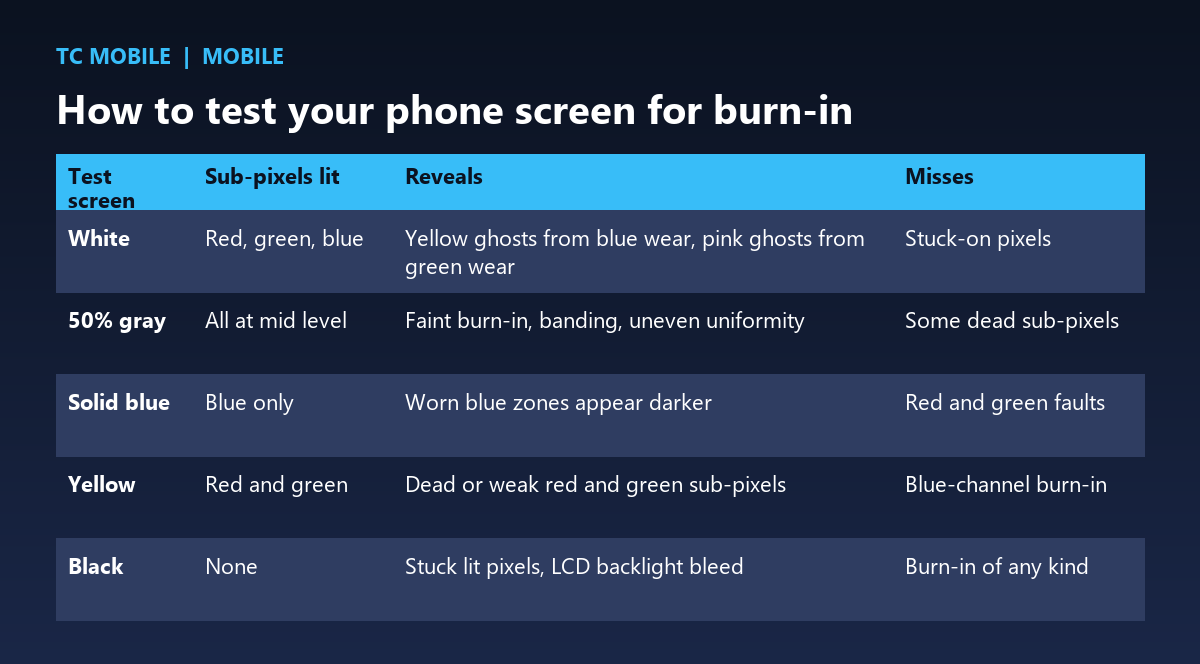
The colour you test with decides what you can see. Many online “yellow screen tests” are designed to find stuck pixels. A yellow image lights only the red and green sub-pixels and leaves blue switched off, so it can’t show blue wear.
| Test screen | Sub-pixels lit | Reveals | Misses |
|---|---|---|---|
| White | Red, green, blue | Yellow ghosts from blue wear, pink ghosts from green wear | Stuck-on pixels |
| 50% gray | All at mid level | Faint burn-in, banding, uneven uniformity | Some dead sub-pixels |
| Solid blue | Blue only | Worn blue zones appear darker | Red and green faults |
| Yellow | Red and green | Dead or weak red and green sub-pixels | Blue-channel burn-in |
| Black | None | Stuck lit pixels, LCD backlight bleed | Burn-in of any kind |
Where to look on a phone
Burn-in follows whatever bright shape sat still the longest. On phones, check these zones first:
- Keyboard area: the lower third of the screen, especially with a light keyboard theme. This is the classic “my keyboard is permanently visible” complaint.
- Navigation strip: three-button icons on Android, or the gesture pill on Android and iPhone.
- Status bar: the clock, battery and signal icons. Burn-in of the status bar and gesture pill is a common iPhone report.
- Always-On Display: the clock position, especially on phones that rarely move it.
- App overlays: navigation-app banners, game HUDs, and video-player and social-app buttons.
Many phones nudge static elements such as the navigation bar or the Always-On clock by a few pixels to spread the wear. That is why people ask, “The navigation bar is supposed to move subtly to prevent burn-in, so why do I still have it?” The shift softens the edges of the ghost, but the middle of the shape still sits in the same place for thousands of hours, so it still ages.
Does screen burn go away?
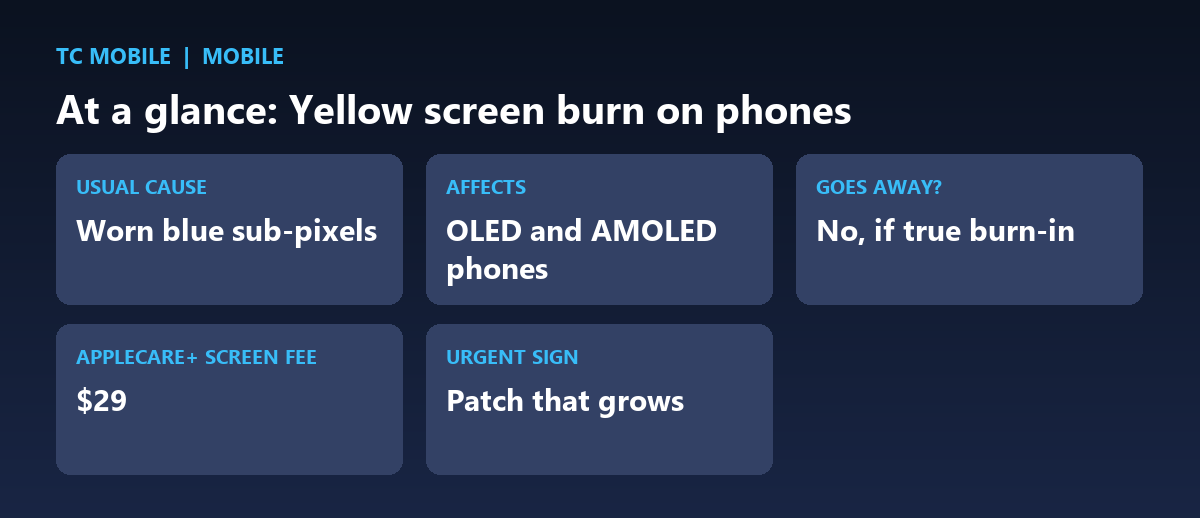
Only some causes go away. True burn-in is permanent, because the organic material has physically degraded and nothing can bring it back.
- Image persistence: fades within minutes of normal use, according to Apple.
- Software tint or bug: disappears as soon as you change the setting or install the fix, as with the One UI 6 workaround and iOS 17.1.
- Pressure marks: mild LCD marks sometimes fade partly over days. Marks from cracked internal layers don’t.
- Swollen battery: never improves on its own and needs a repair.
- Burn-in: stays, and usually deepens if you keep the same habits.
What to do if your screen is burned: fixes that work and ones that don’t
Nothing can repair burn-in, but you can make it much less noticeable, and a new panel removes it completely. Start with the free masking options and keep replacement as the last step.
Hide it
The goal is to stop showing bright, flat colours over the damaged area. These options help most:
- Dark mode: less white content means the yellow ghost has fewer chances to appear.
- A dark keyboard theme: this covers a keyboard ghost and stops the wear from getting worse.
- Gesture navigation: this removes the three-button bar and, on many Android phones, can hide the pill as well.
- White-balance sliders: on Galaxy phones, go to Settings > Display > Screen mode, choose Vivid, then use the advanced RGB controls. Lowering red and green slightly can balance a yellow cast across the whole panel. It won’t erase a local ghost.
- A different wallpaper or Always-On style: busy, darker images hide uneven areas better than flat light colours.
Stop the wear spreading
Switch from three-button navigation to gesture navigation and use a dark keyboard theme. Both remove the static, brightly lit shapes that burn in most often.
What doesn’t fix it
“Burn-in fixer” apps and flashing-colour videos can’t regrow blue emitters. At best, they help image persistence fade, which happens on its own anyway. At worst, they run the rest of the panel at full brightness for hours. That ages the healthy pixels so the burned area stands out less, but it costs your whole display some lifespan. Inverted-image “reverse burn” tricks work the same way.
Replace the display
If the ghost bothers you every day, a new OLED assembly is the only real fix. Book an official repair or an inspection first. A manufacturer may treat early, severe burn-in as a defect, and the costs below show why that inspection is worth having.
Warranty and repair cost in 2026: Apple, Samsung, Google
No major phone maker promises to cover burn-in by name, but none excludes it outright either. Each case is judged at inspection, and physical or liquid damage almost always ends any goodwill. Here is where each brand stands.
| Brand | Official position | Software mitigation | Warranty reality |
|---|---|---|---|
| Apple | Image persistence is normal and temporary; burn-in occurs in extreme cases | Per-pixel usage tracking and calibration; auto-brightness | Diagnosed at Apple; AppleCare+ screen service is $29 |
| Samsung | Community moderators say screen burn isn’t covered by the standard warranty | Pixel shifting; Always-On Display options | Service centres decide case by case; some replace screens with no physical or water damage |
| Called Pixel 2 XL burn-in “differential aging” in 2017 | Pixel shifting; dark theme | Extended Pixel 2 warranty to two years without saying whether burn-in was included |
Apple iPhone
Apple’s support document treats faint image persistence as expected behaviour. A burn-in ghost that doesn’t fade is a different case, and Apple Store or Apple Authorized Service Provider staff decide whether it counts as a defect under the limited warranty. With AppleCare+, a screen repair costs $29. Out of warranty, Apple charges $329 for an iPhone 17, iPhone Air or iPhone 17 Pro screen and $379 for the iPhone 17 Pro Max.
Samsung Galaxy
A Samsung Community moderator has stated that screen burn isn’t covered by Samsung’s standard warranty. Other owner threads from the S20 to S24 era show service centres inspecting phones case by case and sometimes replacing the screen when there’s no physical or liquid damage. A Samsung Care+ plan improves your chances of a low-cost repair. Without one, Samsung’s US cracked-screen repair page lists the S25 Ultra at $279, up from the $259 launch price reported in February 2025. Repair-shop reports put the S25 at about $174 and the S25+ at about $199.
Google Pixel
Google’s best-known statement on burn-in came in October 2017. Responding to Pixel 2 XL complaints, it described the effect as “differential aging” in line with other premium smartphones and extended the Pixel 2 and Pixel 2 XL warranty to two years worldwide, as GSMArena reported. For current models, Google’s US repair pricing guide gives mail-in estimates and confirms the final price after inspection. The genuine Pixel 10 Pro screen assembly alone costs around $243 to $249 through iFixit, Google’s official parts partner, before any labour.
Did you know?
Google answered the Pixel 2 XL burn-in complaints of 2017 by calling the effect “differential aging” and extending the warranty on every Pixel 2 to two years, according to GSMArena.
2026 flagship screen replacement prices (US)
| Phone | Out of warranty | With protection plan | Source and date |
|---|---|---|---|
| iPhone 17 Pro Max | $379 | $29 (AppleCare+) | Apple pricing, 2026 |
| iPhone 17 Pro / 17 / Air | $329 | $29 (AppleCare+) | Apple pricing, 2026 |
| Galaxy S25 Ultra | $279 | Depends on Samsung Care+ tier | Samsung US repair pricing, 2026 |
| Galaxy S25+ | About $199 (reported) | Depends on Samsung Care+ tier | Repair-shop reports, 2026 |
| Galaxy S25 | About $174 (reported) | Depends on Samsung Care+ tier | Repair-shop reports, 2026 |
| Pixel 10 Pro | Genuine part about $243 to $249, plus labour | Depends on Preferred Care or carrier plan | iFixit listing, 2025 to 2026 |
Third-party repair: what to ask for
Independent shops are often cheaper, but the panel they use decides whether the yellow comes back. Ask whether the screen is a genuine or refurbished original OLED, or an aftermarket “incell” LCD or lower-grade OLED. Aftermarket LCD replacements can’t burn in the OLED way. They do bring thicker bezels, weaker colour, higher power draw and, on iPhones, a “non-genuine display” notice. Also ask for a written parts warranty. Edge yellowing after a repair is a fair reason to go back.
How to prevent yellow burn-in on your phone
Prevention comes down to lower brightness, less static white content and shorter screen-on time. The habits that cause the worst damage are hours of navigation or gaming at maximum brightness, often while the phone is charging in a hot car. Heat speeds up OLED ageing, and those apps keep bright banners in a fixed position.
iPhone settings
- Keep Auto-Brightness on (Settings > Accessibility > Display & Text Size). Apple says it reduces burn-in and image persistence.
- Set a short Auto-Lock time in Settings > Display & Brightness. Apple recommends a shorter time.
- Use Dark appearance in Display & Brightness.
- On iPhone 14 Pro and later, use a darker Always On wallpaper or turn Always On off if you rarely look at it.
Samsung Galaxy settings
- Turn on Adaptive brightness and a short Screen timeout under Settings > Display.
- Choose Swipe gestures under Display > Navigation bar, and consider hiding the gesture hint.
- Set Always On Display to Tap to show or As scheduled instead of Show always.
- Pick a dark Samsung Keyboard theme, or use high-contrast dark keys.
Pixel settings
- Keep Adaptive brightness on and set a short Screen timeout under Settings > Display.
- Switch to Gesture navigation under Settings > System > Navigation mode.
- Use Dark theme, and turn off “Always show time and info” if you don’t need it.
- In navigation apps, use night mode or a darker map style on long drives.
Will future phones stop burning yellow?
Yellow burn-in should become much rarer once phones get efficient blue phosphorescent OLED (PHOLED) emitters, because blue would no longer be the weak link. As of November 2026, no shipping phone uses one.
- LG Display has verified mass-production-line performance for a hybrid two-stack tandem OLED. It pairs a blue fluorescent lower layer with a new blue phosphorescent upper layer, and LG Display claims about 15% lower power consumption than existing OLED. Most of its tandem work targets laptops and cars, and no phone with this panel has been confirmed.
- TCL CSOT showed what it calls the world’s first smartphone OLED panels with blue phosphorescent (PSF) emitters at DTC 2026 in November, including a 6.36-inch panel, according to OLED-Info. They are engineering demos with no commercial date.
- Samsung Display has struggled. A November 2023 report covered by GSMArena, citing The Elec and UBI Research, said its blue phosphorescent material had only about 55% of the lifespan of the blue fluorescent material in the M11 OLED set used in the iPhone 13 series.
The fair conclusion is that a two-to-four-year-old phone will still burn yellow under heavy static use, and so will most phones launching in 2027. Tandem OLED stacks, which share the load across two emitting layers, help in the meantime by lowering the current each layer needs.
FAQ
Does screen burn go away?
True burn-in doesn’t go away. Image persistence does, usually within a few minutes of normal use, as Apple notes. If the ghost looks the same after 15 minutes of varied content, treat it as permanent.
What is the yellow screen of death?
The “yellow screen of death” usually means the yellow error page that ASP.NET web apps display when they crash. It has nothing to do with phone burn-in, though some people use the phrase loosely for a display that has turned completely yellow.
How do you fix a yellow screen of death?
On a phone whose whole screen has turned yellow, first turn off warm filters such as Night Shift, True Tone, Eye comfort shield or Night Light. Then restart and install any pending software update. If it’s still yellow, have the display or battery inspected.
What to do if the screen burns?
Confirm it with white and gray test images, then photograph it. If the phone is still under warranty or a protection plan, book an inspection. Otherwise, mask the ghost with dark mode and a dark keyboard, or replace the panel.
Why is my screen burn yellow?
The blue sub-pixels in that area have worn faster than the red and green ones. With less blue, white content looks yellow. If green has worn more than red, the ghost can look pink instead.
Is yellow burn-in covered by Samsung warranty?
A Samsung Community moderator has said screen burn isn’t covered by the standard warranty. In practice, service centres judge each case after inspection and sometimes replace the screen when there’s no physical or water damage.
Does AppleCare cover iPhone burn-in?
Apple judges burn-in case by case at a diagnosis. With AppleCare+, a screen repair costs $29 either way, compared with $379 out of warranty for an iPhone 17 Pro Max.
Can burn-in fixer apps or videos remove yellow burn-in?
No. They can’t restore worn blue emitters. They only age the rest of the panel so the patch blends in, which shortens the life of your whole display.
Why does my phone have a yellow tint on one side?
A tint at one edge usually comes from pressure, adhesive or a swelling battery, especially after a drop or a repair. Viewing the screen at an angle also shifts OLED colour. If the tinted area is spreading, stop charging and get the battery checked.
Can an LCD screen get yellow burn-in?
LCD (IPS and VA) screens don’t get sub-pixel burn-in. They yellow over time as the backlight, polarizer and light-guide layers age. That yellowing is even across the screen rather than shaped like your interface.
My screen turns yellow when I put pressure on the phone. Is that burn-in?
No. A tint that appears under pressure is mechanical damage or battery pressure behind the panel. Stop pressing on it, check the case for bulging, and get it inspected. Swollen batteries only get worse.
Is it worth replacing a burned screen?
Replace it if the ghost shows on screens you use every day and you plan to keep the phone for another year or more. If it only shows on test images, dark mode and gesture navigation are the cheaper fix. In that case, put the money toward your next phone.
About this article
- Fact-checked against the sources listed below before publication.
- Published
Sources (8)
- About the Super Retina display and Super Retina XDR display on your iPhone - Apple Support (support.apple.com)
- iOS 17.1 display image retention fix - MacRumors (macrumors.com)
- Apple Says Minor Screen Burn-In and Shifts in Color When Looking at iPhone X Off-Angle Are Normal - MacRumors (macrumors.com)
- One UI 6 yellow screen issue on Galaxy phones: solution found - SamMobile (sammobile.com)
- Google calls Pixel 2 screen burn-in non-issue, extends warranty to two years - GSMArena (gsmarena.com)
- Burn-in - Samsung Community (eu.community.samsung.com)
- iPhone repair cost 2026: screen and battery price for every model - AppleScoop (applescoop.org)
- Phone repair costs hit record highs in 2026 - MagBak (magbak.com)