





A thin green line running down an OLED phone screen is one of the most common display faults on Samsung, Google and OnePlus phones, and software almost never fixes it. This guide shows you how to tell a fixable glitch from a failing panel in about a minute, what each color and direction of line usually means, and which free repair programs and US prices apply. Programs and prices were checked in November 2026.
Key takeaways
- A line that stays out of screenshots and shows on the boot logo is a hardware fault.
- Single green or pink vertical lines on OLED phones usually get worse over time, so back up today.
- A factory reset almost never fixes a line, and it wipes your data.
- Google’s Pixel 9 Pro and 9 Pro XL program and OnePlus’s Green Line Worry-Free Solution can cover the repair for free.
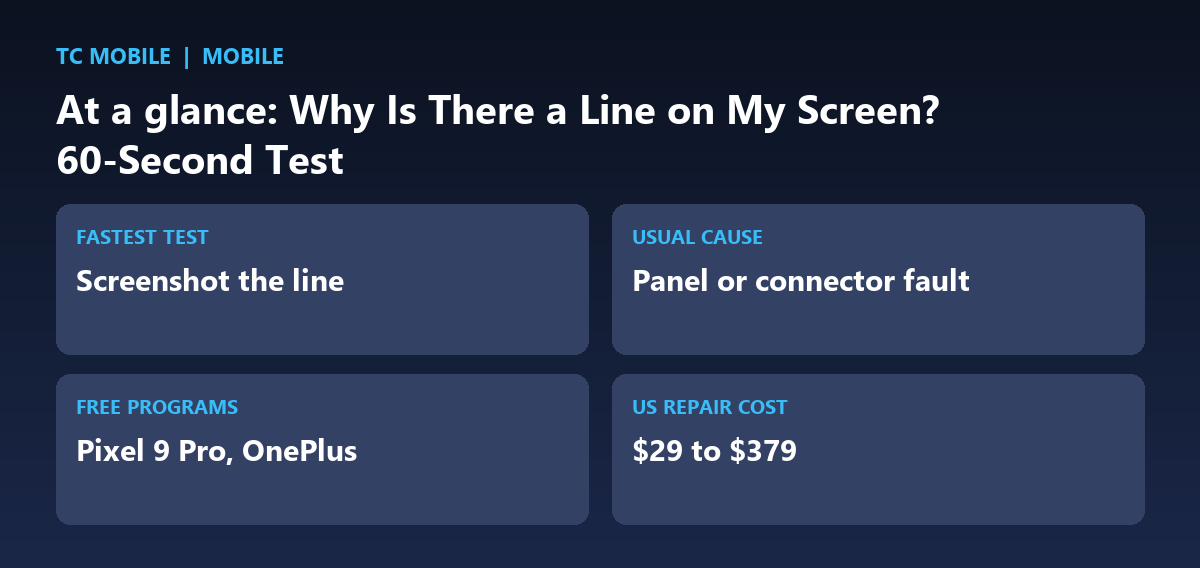
- Out-of-warranty US screen repairs run from $174 (Galaxy S25) to $379 (iPhone 17 Pro Max). With AppleCare+ or Samsung Care+ the fee is $29.
Fact-checked
We checked these key facts against the sources named, on November 23, 2026:
- Row driver faults, drops, heat and sometimes display firmware bugs, as with the early Pixel 10 “screen snow” fixed in September 2025 (source: digit.in)
- Its Green Line Worry-Free Solution, announced in December 2024, covers all OnePlus phone models, old and new, with a new display even when the phone is out of warranty, GSMArena reported (source: gsmarena.com)
The short answer
On a modern OLED phone, a line that won’t go away almost always means the display panel, its display driver IC or the connection to the board is failing. A smaller share are software glitches that a restart or an update clears. The quick test below tells you which one you have.
Seeing a line on a laptop, monitor or TV? The same screenshot test works there.
Android Authority’s repair guide says vertical and horizontal lines are usually a hardware problem that software can’t fix. Physical stress, such as the phone being bent, often sets them off. Google’s own Pixel support page lists flicker, a green tint, horizontal or vertical lines, a screen that won’t turn on and cracks as signs of a possible hardware issue.
The usual causes, roughly from most to least common:
- OLED panel or driver failure. Columns or rows of pixels lose their signal, which gives you the classic thin green or pink line.
- Drops and impact. These can crack the panel under intact glass or loosen the display connector.
- Bending and pressure. A tight back pocket, a bent frame or a stiff case can all do it.
- Liquid. Corrosion on the connector or flex cable often shows up days after the spill.
- Heat. Lines can appear when the phone overheats and fade once it cools.
- A previous repair. A badly seated connector or a low-grade replacement panel can cause lines.
- Software. A buggy update, display firmware or a developer overlay setting.
Back up first
Back up your phone today. Lines from panel failure often multiply, or the whole screen goes black, and a backup is much harder to make once you can’t see anything.
60-second test: software glitch or broken display?
Three checks settle most cases. If the line is missing from a screenshot, shows on the boot logo and stays in the same spot across apps, the display hardware is at fault.
- Take a screenshot while the line is visible.
- Send it to another device or open it on a computer, then look at it there.
- Restart the phone and watch the Apple, Samsung, Google or OnePlus logo as it boots.
- Open three different apps and rotate the phone once.
- Note whether the line moves, flickers or changes color.
The screenshot test
A screenshot saves what the phone’s software is drawing, not what the panel shows. According to iFixit’s diagnostic wiki, if the lines also appear in the screenshot, the cause is probably software. If they don’t, the panel or its connection is to blame.
You have to view the screenshot on a different screen. If you open it on the damaged phone, you’ll see the line on top of the image and the test tells you nothing.
There’s one exception to watch for. Android’s developer options, such as “Show surface updates” or “Show layout bounds”, draw colored lines and boxes that can end up in screenshots. Turn these off before you decide it’s a software bug.
The boot logo test
The boot logo appears before iOS or Android has fully loaded. None of your apps, themes or display settings are running yet. A line that cuts through the logo is coming from the panel, the driver IC or the cable.
If the logo looks clean and the line only shows up once the home screen loads, it’s worth trying the software fixes below.
Does it move, flicker or change with pressure?
Hardware lines stay fixed to the panel. They sit in the same place in every app and when you turn the phone sideways. A line that only shows up in one app, or that moves with the content, points to that app or to a software bug.
Press once, lightly, near the edge closest to the line. If the line flickers, thickens or disappears, the connector or flex cable is the likely problem, which often happens after a drop. Don’t keep pressing. That’s a one-time check, not a fix.
| Result | What it means |
|---|---|
| Line in screenshot, not on boot logo | Software or a setting. Try the fixes below |
| Line not in screenshot, on boot logo | Hardware. Go to warranty or repair |
| Line changes with light pressure | Loose connector, flex cable or cracked panel |
| Line only in one app | App bug. Update or reinstall that app |
| Line only when hot | Heat stress. Cool the phone and watch whether it returns |
What your line’s color and direction mean
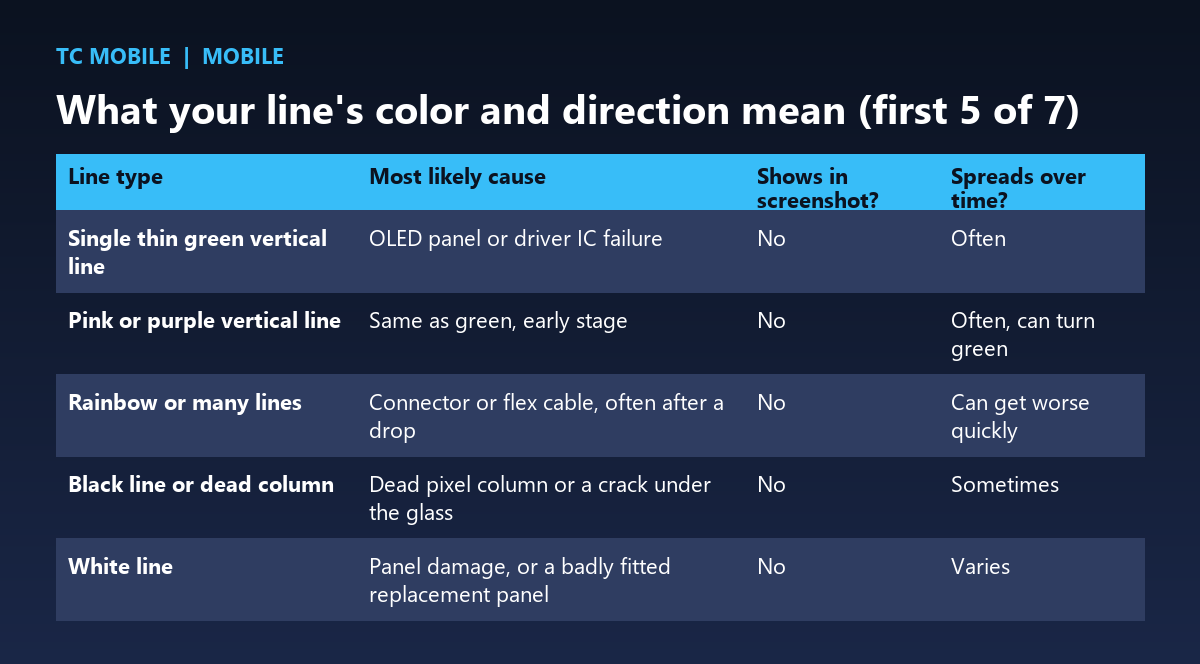
Color and direction are strong clues. A single thin green or pink vertical line usually means the OLED panel is failing. Rainbow or many lines point to the connector. Black columns are dead pixels.
| Line type | Most likely cause | Shows in screenshot? | Spreads over time? | DIY fixable? | Next step |
|---|---|---|---|---|---|
| Single thin green vertical line | OLED panel or driver IC failure | No | Often | No | Check repair programs, then warranty |
| Pink or purple vertical line | Same as green, early stage | No | Often, can turn green | No | Back up, document, claim |
| Rainbow or many lines | Connector or flex cable, often after a drop | No | Can get worse quickly | Only by reseating, which is a repair job | Repair shop or maker |
| Black line or dead column | Dead pixel column or a crack under the glass | No | Sometimes | No | Display replacement |
| White line | Panel damage, or a badly fitted replacement panel | No | Varies | Rarely | Return to whoever fitted the screen |
| Horizontal band or flicker | Row driver fault, heat or a display firmware bug | Sometimes | Varies | Sometimes, with an update | Update, restart, then repair |
| Lines in one app only | Software | Yes | No | Yes | Update or reinstall the app |
Green or pink vertical line (OLED panel failure)
This is the most widely reported problem on Samsung, Google and OnePlus phones. It’s usually one pixel wide, runs the full height of the screen and doesn’t go away. It sometimes starts pink and turns green later.
These lines rarely fix themselves. If you’ve seen a thin green line on the left side of an iPhone 14 and wondered whether it will go away, the honest answer is that it almost never does. Plan for a repair.
A common question is whether a single pink line is a board issue or a screen issue. If it misses the screenshot and runs edge to edge, it’s almost always the screen. That includes the driver IC, which is bonded to the panel, so you can’t change one without the other.
Rainbow or multiple lines (connector, flex cable, drop damage)
Bunches of colored lines, often flickering, usually mean the signal between the board and the screen is getting damaged. Drops, bending and liquid corrosion are the usual causes. Sometimes reseating the connector fixes it. Often the flex cable is part of the panel, so the whole display has to be replaced.
Black or white lines
A black line is a strip of pixels that no longer lights up. OLED pixels make their own light, so a dead column shows as a hard black strip. White lines are often caused by pressure damage or a low-grade replacement panel.
If you fitted a screen from a kit and now see a white line, the likely suspects are a torn or badly seated flex cable or a faulty aftermarket panel. Contact the seller before you open the phone again.
Horizontal lines and bands
Horizontal lines follow the same rules but are more often linked to heat, drops and display firmware. Google’s Pixel 10 series is a recent software example. Early units showed colored static and lines, which reports called “screen snow”. Google fixed most of these with the September 2025 update (build BD3A.250721.001.B7), and Notebookcheck and Android Authority reported further display fixes in later patches.
Fixes to try first, ranked
Start with the screenshot test, then work through the steps in order. Each one is safe for your data, and the most useful ones come first.
How these fixes are ranked: steps that can’t harm your data or the hardware come first. After that, the order follows how likely each step is to help, based on maker documentation and repair guides such as iFixit. Free steps come before paid ones. Steps that wipe data are last.
- Screenshot test, then back up (top pick). It costs nothing, takes a minute and tells you whether any other step is worth trying.
- Let the phone cool down. Close games and the camera, stop charging and wait 15 to 30 minutes. If the lines only appear when the phone is hot, tell the repair shop.
- Remove the case and screen protector. A cracked tempered-glass protector can look like a line. A tight case can also press on a bent frame. Lay the bare phone on a flat table. If it rocks, the frame may be bent.
- Force restart. This clears frozen display states. See the table below.
- Update the OS and your apps. Display firmware ships inside system updates.
- Try safe mode on Android. This rules out third-party apps and overlays.
- Turn off overlays and color settings. On Android that means developer options overlays and Color correction. On iPhone, check Color Filters and True Tone.
- Go to warranty or a repair program. If the line is still there after steps 1 to 7, you’re dealing with hardware.
Restart or force restart by brand
A force restart cuts power to the running software without touching your data. Apple, Samsung and Google each use a different button combination.
| Brand | Button sequence | Works when screen is frozen? |
|---|---|---|
| iPhone 8 and later | Press and release Volume Up, then Volume Down, then hold the Side button until the Apple logo appears | Yes |
| Samsung Galaxy | Hold Side and Volume Down together for about 7 seconds, until it restarts | Yes |
| Google Pixel | Hold Power and Volume Up together for up to 30 seconds | Yes |
Update and check safe mode
Install any pending system update in Settings. On a Pixel 10, for example, the snow fix only arrived through an update.
To start safe mode on a Galaxy, open the power menu, touch and hold “Power off” until “Safe mode” appears, then tap it. On a Pixel, open the power menu, touch and hold “Restart” and confirm. If the line disappears in safe mode, a recently installed app is causing it. Remove apps one at a time until it stops.
Why a factory reset rarely helps
A factory reset erases your phone but leaves the hardware exactly as it was. If your screenshot looked clean, a reset won’t fix the line. You’ll just lose whatever you hadn’t backed up, and that’s a real risk if the panel goes black before you can restore.
Only think about a reset if the line shows up in screenshots and survives safe mode and updates. Back up first.
Watch out
Skip the online “hacks”. Leaving the screen on a white image at full brightness while charging overnight doesn’t “dry” water damage, and the heat makes things worse. Tapping or pressing hard on the line can crack the panel. “Pixel fixer” apps can’t repair a dead driver line.
Line on iPhone screen
iPhone lines follow the same rules: do the screenshot test, then check the Apple logo at boot. Before you book a repair, force restart, update iOS in Settings > General > Software Update, and check Color Filters under Settings > Accessibility > Display & Text Size.
You can repair through the Genius Bar at an Apple Store, an Apple Authorized Service Provider such as uBreakiFix by Asurion, or Apple’s mail-in service. To check your coverage, go to Settings > General > AppleCare & Warranty.
Green line on iPhone after an iOS update
Owners regularly post on Apple’s community forums that a green line appeared after an iOS update and that Apple refused a free replacement. Apple hasn’t published a repair program for green lines on recent iPhones. A line that misses screenshots still counts as a hardware fault in Apple’s assessment.
Evidence helps your case. Keep the date of the update, the iOS version and photos of the line. If the phone is still inside Apple’s one-year limited warranty, a defect with no damage should be covered no matter what triggered it. After that year, US state law can still help. The implied warranty of merchantability, which comes from the Uniform Commercial Code that every state except Louisiana has adopted, means a phone you bought has to do what a phone is supposed to do. How long that protection lasts depends on your state. The “Your US rights if a claim is refused” section below explains how to use it.
iPhone screen repair cost in 2026
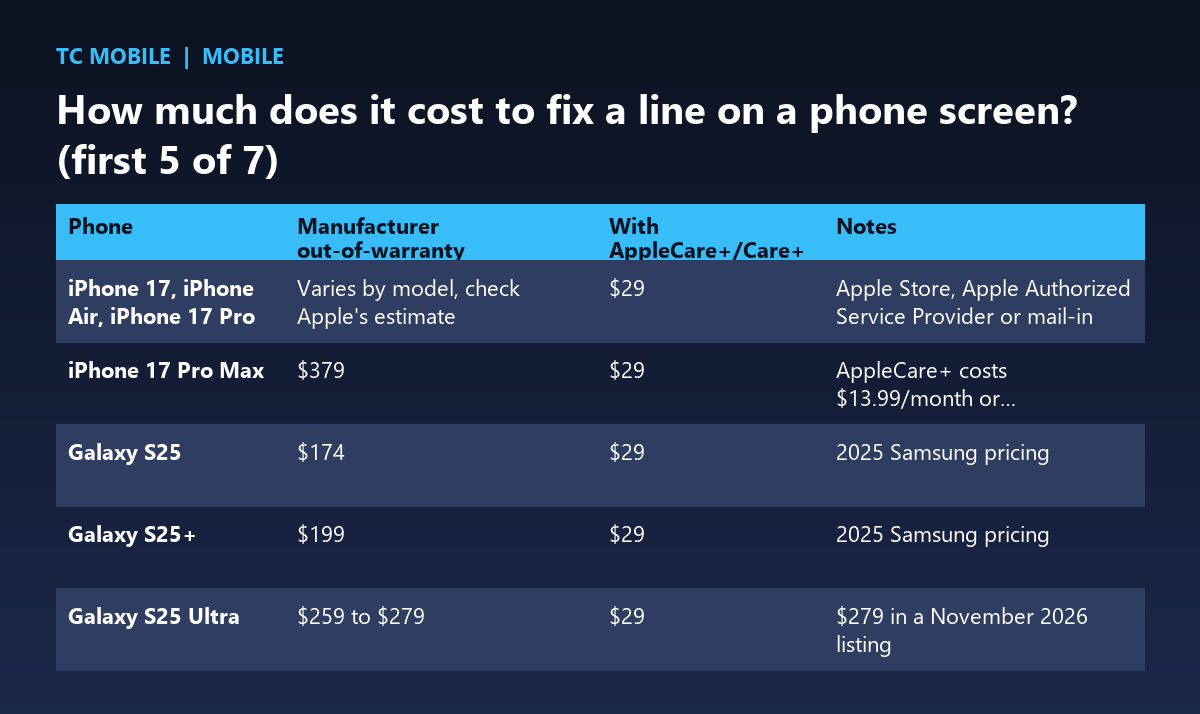
Apple’s out-of-warranty screen repair prices differ by model and repair type, so check Apple’s current repair estimate for your iPhone. The iPhone 17 Pro Max costs $379. With AppleCare+, the screen repair fee is $29.
Line on Samsung Galaxy screen
Samsung has the longest record of green and pink lines. Owners have reported them since 2023 on the Galaxy S20, S21 and S22 series and the Galaxy Note 20 Ultra, and Samsung ran one-time free replacement offers in some regions, India in particular.
Green or pink line after One UI 8.5
In June 2026, Android Authority and SamMobile reported that Galaxy S23 owners, along with some Galaxy S21 FE users, were seeing green or pink vertical lines after installing One UI 8.5. Samsung hadn’t offered a solution when those reports came out.
That answers a question forum users often ask: if a pink line appeared after the One UI 8 update, is it software or hardware? Even when an update seems to trigger it, the line usually behaves like hardware. It misses screenshots and survives a reset. No update has been shown to clear these lines.
Did you know?
SamMobile reported in June 2026 that some Galaxy S23 owners saw their line appear pink at first, then turn green after the One UI 8.5 update.
Will Samsung replace the screen for free?
Sometimes, depending on where you live, but don’t count on it. SamMobile reported that Samsung was replacing displays on affected Galaxy S23 units until December 25, 2025. In India, the panel was covered but a labor fee was charged, and the phone had to be under three years old with no physical damage.
What happened in 2026 is unclear. Some Samsung Members threads in India describe an extension to July 2026. Other users say service centers told them free replacement ended on June 30, 2026. These are forum reports, not official Samsung statements. If a service center tells you the free green line replacement has ended, ask for that in writing and escalate through Samsung Members support.
Galaxy screen repair cost
In 2025, Android Authority listed Samsung’s own screen repair prices as $174 for the Galaxy S25, $199 for the S25+ and $259 for the S25 Ultra. A November 2026 listing puts the S25 Ultra front-screen-only repair at $279. Samsung Care+ cracked-screen claims cost $29.
Line on Google Pixel and other Android phones
Google is the only one of the big three US brands with an active, official program for screen lines right now. It covers the Pixel 9 Pro and Pixel 9 Pro XL.
Pixel 9 Pro and 9 Pro XL repair program
Google announced the Pixel Extended Repair Program on December 8, 2025. According to Google’s support page, it covers display defects for three years from the original retail purchase date. The program replaces the display for free after the repair facility inspects the phone.
The conditions, as listed by Google and reported by Android Central:
- The vertical line must run from the bottom of the display to the top.
- Flicker is also covered on the Pixel 9 Pro, but not the 9 Pro XL.
- A cracked display or cover glass makes the phone ineligible.
- Water or liquid damage may not be covered.
- Repairs carry a 90-day warranty.
If your Pixel 9 Pro XL has a permanent vertical pink line and no physical damage, use Google’s eligibility checker on the program support page, then book a mail-in or walk-in repair. Pixel 9 Pro buyers from launch in August 2024 are covered into 2027.
Pixel 9 Pro check
Before you pay for anything, make sure the line runs all the way from top to bottom and the glass isn’t cracked. Then run Google’s eligibility checker. A partial line doesn’t qualify.
Google’s record isn’t spotless. Wccftech reported in 2025 that Google tried to charge a Pixel 9 owner $400 to fix green lines that appeared right after a Google security update. Escalating with dated evidence still matters.
Pixel 10 Pro colored lines
The Pixel 10 Pro’s problem was mostly software. The September 2025 update largely fixed the “screen snow” and colored lines that showed up at launch. If your Pixel 10 Pro still shows lines after all updates and the lines don’t appear in screenshots, treat it as hardware and use the standard one-year US warranty.
OnePlus green line lifetime warranty
OnePlus has the most generous policy. Its Green Line Worry-Free Solution, announced in December 2024, covers all OnePlus phone models, old and new, with a new display even when the phone is out of warranty, GSMArena reported.
OnePlus India’s lifetime display warranty page says free replacement applies within the parts supply period. It excludes damage caused by people or external factors. The policy grew out of an August 2023 India offer for the OnePlus 8 and 9 series.
Xiaomi, Motorola and other brands handle lines under their standard warranty. If you plan to choose a phone soon, it’s worth weighing how repairable it is and whether genuine screens are affordable, because display failure is a common way flagships die.
Free repair programs for screen lines (November 2026)
As of November 2026, only Google and OnePlus have current, official programs that cover screen lines. Samsung’s offers were regional and their end dates are disputed.
| Brand | Models | Symptom covered | Time limit | Exclusions | How to claim | Status (Nov 2026) |
|---|---|---|---|---|---|---|
| Pixel 9 Pro, Pixel 9 Pro XL | Vertical line from bottom to top. Flicker on 9 Pro only | 3 years from purchase | Cracked glass. Liquid damage may be excluded | Google eligibility checker, then mail-in or walk-in | Active | |
| OnePlus | All models | Green line | Parts supply period | Human or external damage | OnePlus service center | Active, check your region |
| Samsung (India) | Galaxy S23, earlier S20, S21, S22 and Note 20 offers | Green or pink lines | Under 3 years old, reportedly | Physical or liquid damage. Labor fee charged | Samsung service center | Officially ran to Dec 25, 2025. 2026 extension reports conflict |
| Samsung (One UI 8.5) | Galaxy S23, some S21 FE | Lines after update | None announced | Not stated | Samsung Members, service center | No official program |
How much does it cost to fix a line on a phone screen?
In the US, an official screen repair costs between $174 and $379 without coverage, or $29 with AppleCare+ or Samsung Care+. If your phone qualifies for one of the programs above, it’s free.
| Phone | Manufacturer out-of-warranty | With AppleCare+/Care+ | Notes |
|---|---|---|---|
| iPhone 17, iPhone Air, iPhone 17 Pro | Varies by model, check Apple’s estimate | $29 | Apple Store, Apple Authorized Service Provider or mail-in |
| iPhone 17 Pro Max | $379 | $29 | AppleCare+ costs $13.99/month or $139.99/year |
| Galaxy S25 | $174 | $29 | 2025 Samsung pricing |
| Galaxy S25+ | $199 | $29 | 2025 Samsung pricing |
| Galaxy S25 Ultra | $259 to $279 | $29 | $279 in a November 2026 listing |
| Pixel 9 Pro, 9 Pro XL | Free if eligible | Not needed | Genuine display part is $212.99 through iFixit |
| Pixel 10 Pro | Use Google’s repair cost estimator | Varies by plan | Genuine display part is $249.99 through iFixit |
At third-party shops, uBreakiFix by Asurion advertises Pixel screen repairs starting at $119.99, with a one-year limited warranty. Low quotes usually mean an aftermarket panel. Those are often dimmer, thicker or less color-accurate than the original. On recent iPhones, a non-genuine display shows up in Settings as an unknown part.
Here’s what a protection plan really costs: one year of AppleCare+ for an iPhone 17 Pro Max ($139.99) plus the $29 fee comes to $168.99. That’s still well under the $379 out-of-warranty price, but only if something actually breaks.
Before you hand your phone over
Hand your phone over with your data backed up and the evidence saved. Repairers usually refuse these claims because of visible damage or because the phone is out of warranty, so proof matters.
- Back up to iCloud, Google One, Samsung Cloud or a computer.
- Photograph and video the line, including the boot logo.
- If it appeared after an update, screenshot your build number in Settings > About phone and note the date.
- Check your warranty in Settings on iPhone, in Samsung Members or through the Google Store.
- Remove any cracked screen protector and photograph every side of the phone.
- Keep your proof of purchase handy.
- If you’re refused, ask for the reason in writing. US federal and state law may still give you a claim (see below).
Buying tip
If the line appeared right after an update, keep the screenshot of your build number and the date together. That timeline is your strongest argument for a free repair.
Your US rights if a claim is refused
If the maker says no, you have three tools: the implied warranty under your state’s law, the federal Magnuson-Moss Warranty Act, and a complaint to the FTC or your state attorney general.
| Protection | What it does | Where it applies to a screen line |
|---|---|---|
| Implied warranty of merchantability (state law, UCC 2-314) | Promises the goods will do what they’re supposed to do, unless the item was lawfully sold “as is” | A line that appears with no damage can count as a defect. How long the protection lasts varies by state |
| Magnuson-Moss Warranty Act | Bars makers from voiding a warranty or denying a claim just because you used a third-party part or an independent repair shop | Still applies after an earlier third-party repair. The maker can refuse only if that repair caused the fault |
| FTC complaint (ReportFraud.ftc.gov) | Reports a “warranty void” refusal or other deceptive warranty practice | Use it if you were told the warranty was void because of an independent repair |
| State attorney general | Handles consumer complaints and enforces state warranty and consumer protection laws | Use it when a defect claim is refused in writing |
Did you know?
The FTC has sent warning letters to companies, including makers of PC gaming rigs, telling them that warranty language implying third-party repair voids coverage violates the Magnuson-Moss Warranty Act.
Final words
Screenshot the line now. If the screenshot looks clean, skip resets and app fixes. Back up the same day and start the claim: Google’s checker for a Pixel 9 Pro, OnePlus service for any OnePlus, or a warranty or AppleCare+ claim for everything else. Get any refusal in writing so you can take it further. If the repair costs more than half of what the phone is worth, putting that money toward an affordable new phone may make more sense than paying $379 for a new screen.
FAQ
Why is there a line on my screen?
On a phone, the usual cause is a failing OLED panel, driver IC or display connector, often after a drop, bending, liquid or heat. If the line also cuts through the boot logo, software can’t be the cause.
How do I fix a green line on my Android phone screen?
Restart, update and try safe mode. If the line is still there, the display needs replacing. Check Google’s Pixel 9 Pro program or OnePlus’s Green Line Worry-Free Solution before you pay.
How do I fix rainbow lines on my phone screen?
Rainbow or multiple lines usually mean a damaged connector or flex cable. A repair shop can sometimes reseat it, but most phones need a new display.
How do I remove a black line on my phone screen?
You can’t remove it with software. A black line is a column of dead pixels or a crack under the glass, and the panel has to be replaced.
How do I remove a pink line on a Samsung screen?
Back up first, because pink lines often turn green and spread. Then contact Samsung or Samsung Members with photos and proof of purchase. Free replacement depends on your region and the phone’s age.
Why is there a line on my iPhone screen?
Usually it’s panel or connector damage. Force restart, update iOS and do the screenshot test. If the line is missing from the screenshot, book with Apple or an Apple Authorized Service Provider.
What causes horizontal lines on a phone screen?
Row driver faults, drops, heat and sometimes display firmware bugs, as with the early Pixel 10 “screen snow” fixed in September 2025.
Can a software update cause lines on a phone screen?
Updates can cause software lines that a later patch fixes, as on the Pixel 10. Many lines that appear after an update behave like hardware, though, such as the Galaxy S23 cases after One UI 8.5.
Will a factory reset fix lines on my screen?
Almost never. A reset can’t fix hardware, and it wipes your data. Only try it if the line appears in screenshots and survives safe mode.
Will Samsung replace a green line screen for free?
Sometimes, depending on region and phone age, usually under three years old with no damage. As of November 2026 there’s no official US program, so ask your service center for written terms.
Does a third-party screen repair void my warranty in the US?
Not by itself. Under the Magnuson-Moss Warranty Act, a maker can’t deny a warranty claim just because an independent shop worked on the phone. It can still refuse to cover damage that the repair caused.
About this article
- Fact-checked against the sources listed below before publication.
- Published
Sources (8)
- Google Pixel 9 Pro and Pixel 9 Pro XL Extended Repair Program (support.google.com)
- Google admits some Pixel 9 Pro units are faulty, offers three years of free repairs (androidcentral.com)
- Google Pixel support: display hardware issues (support.google.com)
- OnePlus announces new program to deal with green line issue (gsmarena.com)
- OnePlus India lifetime display warranty (oneplus.in)
- OnePlus green line screen warranty in India (9to5google.com)
- Galaxy S23 users facing green line issues after One UI 8.5 update (androidauthority.com)
- Galaxy S23 users report green, pink display lines with One UI 8.5 (sammobile.com)